PlayerJump Class
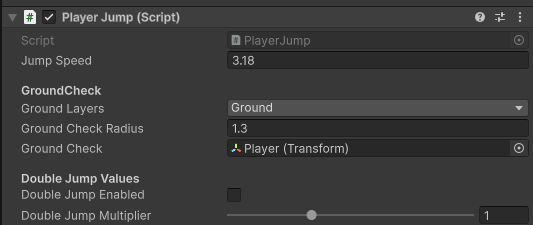
Class that controls the player jump
Events
OnPlayerJump()
Triggers when the player does a normal jump.
OnPlayerDoubleJump()
Triggers when the player does a double jump. Only triggers when the doubleJumpEnabled bool is set to true (ticked in the editor).
OnPlayerLand()
Triggers when the player lands from any fall.
OnPLayerReleaseJump
Triggers when the player releases the jump button and cuts their fall short.
OnPlayerLeavesGround()
Triggers when the player has left the ground. Either from pressing the jump button or falling from a high place.
Accessible Variables (In Code)
public bool isGrounded
Whether or not the player is in the air. Cannot be changed by other classes. If the player isGrounded then they can jump
public bool isDashing
Changes to true when the player isDashing or false. Not recommend to touch this yourself, may be removed in the future.
public void EnableDoubleJump(bool enable)
Enables or disables the player's double jump. Used in the doubleJumpItem script.
Accessible Variables (In Unity Editor)
float jumpSpeed
Adjusts both the max height they can jump and changes the speed at which they go up.
GroundCheck values
LayerMask groundLayers
List of the layers in your game that are defined as ground layers. If it says Nothing you should create and pick a layer like "Ground" and apply that layer to your floor objects.
float groundCheckRadius
How big the ground detection radius. When a grounded object colides with this radius the game will assume that the player isGrounded and therefore be able to jump. Recommended that this value is very small.
Transform groundCheck
The gameobject where the groundcheck radius will start from. By default it is set to the player.
Double Jump Values
bool doubleJumpEnabled
Whether or not the double jump ablity is enabled on the start of the game
float doubleJumpMultiplier
How much higher/lower the player can jump compared to the normal jump. Default value is 1 meaning the amount of jump the player gets doesn't change with a double jump.